Lists to Segments Change Management
With the introduction of Segments, PropFuel has made several meaningful updates to how contacts are organized and managed. This article covers what changed, what it means for your existing setup, and what to expect going forward.
Lists Are Now Segments
Segments are the new way to organize contacts and manage them on campaigns in PropFuel, replacing both Lists and Contact Workflows. Segments can be used directly in campaigns to enroll or suppress contacts without extra steps, replacing the need for separate Lists and Contact Workflows.
Segments help define precise audiences for campaigns, track engagement patterns, and examine the actions and sentiment of specific cohorts, ensuring the right message reaches the right people.
Your existing lists have been automatically converted to segments by PropFuel, retaining their configuration and details, run history, original creation date, and associated campaigns. Any pinned lists will now appear as favorite segments.
Comparing Lists and Segments
List | Segment |
Notes | Description |
Schedule: Run Automatically | Segment Type: Dynamic |
Schedule: Run Manually | Segment type: Static |
Pin | Favorite |
Tags | Tags |
Segments offer all the filter options previously available in Lists and contact workflows, plus a few new variables, like SMS deliverability and refining suppressed or removed contacts by date.
Using Segments in Campaigns
Segments can be used directly in campaigns to enroll or suppress contacts without extra steps. Campaigns now have a Contacts tab where you can enroll contacts using a segment, via CSV upload, or by adding them individually from the Contact directory.
Learn more about enrollment here
The Workflows tab remains in the campaign editor for now. You can also create a Segment from any existing workflow on a campaign by clicking the gear icon in the Workflows tab and selecting “Create Segment from Workflows.”
Suppression & Conversion Lists
Just as you could with Lists, you can use any segment for campaign suppression or conversion reporting. Like all lists, your existing suppression and conversion lists have been automatically converted to Segments — no action is needed on your end.
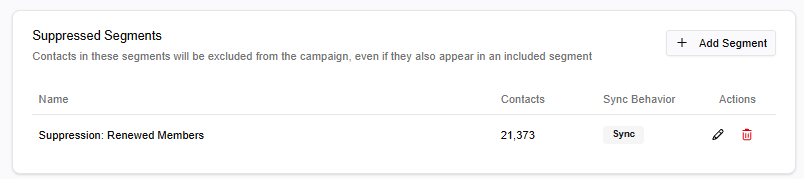
Suppression lists: If a list was attached to a campaign as a suppression list, its corresponding Segment is now attached to that same campaign as a Suppressed Segment on the campaign’s Contacts tab.
Conversion lists: If a list was used for conversion reporting on a campaign, its corresponding Segment is now attached to that same campaign. Conversion tracking has moved to the campaign’s History tab – the same location where conversion charts appear. To add a segment for conversion tracking, click Track Conversions. To remove a segment, click the X in the top right corner of the conversion chart.

Segments FAQs
Why are you removing Lists? | We haven't removed the concept – we've upgraded it! Segments do everything Lists did and more. Segments are easier to reuse and maintain, deliver more powerful insights, and can be used directly in campaigns without extra steps. |
Do I need to rebuild all my Lists? | No. Your Lists are being automatically converted to Segments by PropFuel. You don't need to do a thing. Going forward, anything you’d build as a list will be built as a segment. |
What happened to my Suppression Lists on my campaigns? | Those are being automatically added under Suppressed Segments on the Contacts tab of your campaigns. |
What happened to my Conversion Lists on my campaigns? | Adding and managing conversions will now happen on the History tab of the campaign editor, now all in one place where you review your conversion charts. Just like suppression lists, conversion lists will be automatically converted to a segment and added as a conversion segment on your campaigns. |
What about my Contact Workflows? | Contact Workflows are no longer necessary for managing campaign contacts. Segments handle this process using the same criteria logic you used in workflows. Using the tool provided in the Workflows tab, you can convert any campaign workflow into a Segment. |
Are the filter options the same as they were in Lists? | Segments offer all the filter options previously available in Lists and contact workflows, plus new additions to help you precisely target your desired audience. |
Is this more complicated? | It's actually simpler. Instead of managing separate Lists and contact workflows, everything lives in one place: Segments. |