
Contact Statuses in a Campaign
Every contact in a campaign has a status that tells you whether or not they are hearing from you, and if not, why not?
Each contact enters a campaign one of three ways: through a segment, a CSV import, or by being added individually by a PropFuel user. Upon enrollment, contacts are set as Active and will begin receiving check-ins as planned.
From there, a contact's status can shift for a few different reasons.
Contacts can be Suppressed, which pauses their communication without removing them from the campaign. It happens when they match criteria you've set up to suppress them. You'll also see contacts paused as Bounced, No SMS, or Unsubscribed; these are typically blocked-delivery issues rather than something deliberate. Either way, these statuses are pauses, not exits: contacts stay enrolled and will continue to receive check-ins once the pause clears, without anyone having to re-add them.
For a closer look at how suppression criteria work, see Suppression Segments.
Contacts can be Dropped from the campaign in two ways. Most often, it's automatic: if the segment that enrolled them is set to Continuous Sync, they're dropped the moment they no longer match its criteria, and set back to Active automatically once they match again. The same status also applies if you remove a segment from a campaign and choose to drop the contacts it brought in. In that case, getting back to Active requires either matching a different segment still attached to the campaign, or a PropFuel user manually re-adding them.
Contacts can be Removed, which only happens through a deliberate action: a manual removal by a PropFuel user, an import that removes them, or a legacy contact workflow if the campaign still uses it. Getting back in requires a manual re-add by a PropFuel users, or through re-enrollment if enabled for your campaign.
Note: Segments have replaced contact workflows. If your campaign still uses the legacy contact workflows, read more about that change here.
Contact Status Flow
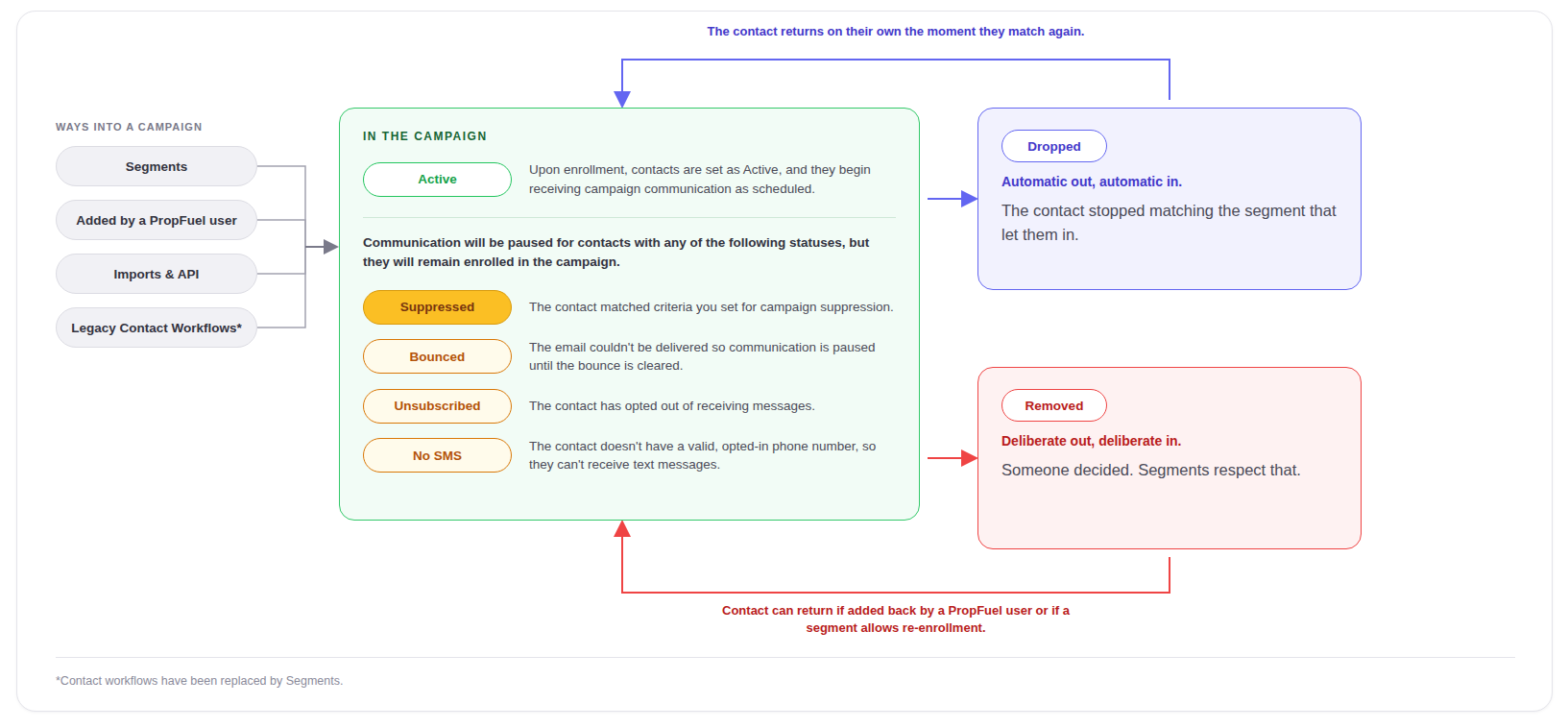
Together, these statuses show you exactly where a contact stands in a campaign, and why. That visibility helps you understand how contacts are flowing through your campaigns, not just whether emails and SMS went out.